WiZ Connected
WiZ Connected
Category
House & Home
| Technical Specification | Download | |
|---|---|---|
| Latest Updated | ||
| Latest Version | ||
| Developer | ||
| Operating system | Android, iOS | |
| Language | English | |
| Price | Free | |
| Available version | ||
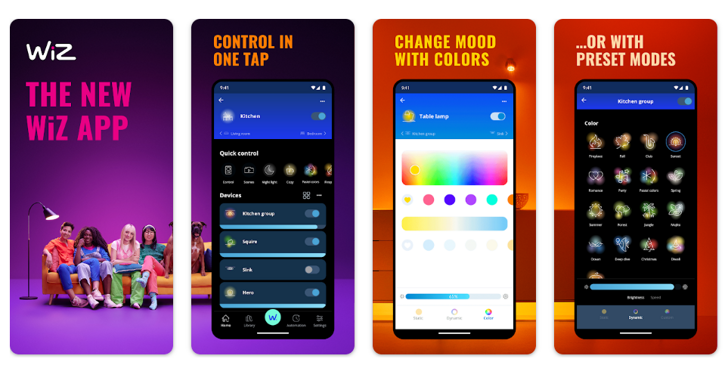
- WiZ Connected is a smart lighting application designed to enhance your home lighting experience effortlessly. Users can control and customize their lighting from anywhere, setting schedules, adjusting brightness, and selecting colors to create the perfect ambiance. The app supports voice commands and integrates seamlessly with smart home systems, offering convenience and accessibility. By utilizing energy-efficient lighting solutions, WiZ Connected promotes eco-friendliness while enabling users to achieve personalized environments that cater to their mood and lifestyle.
More Details
- Below are some of the notable features of the WiZ Connected app:
- Real-Time Lighting Control: Users can manipulate their lighting experiences in real-time from any location via the app, utilizing Wi-Fi connectivity to communicate with compatible smart bulbs. This feature allows for instant adjustments to brightness and color settings, enhancing user convenience while adapting the ambiance to suit any occasion.
- Scheduling and Automation: The app provides robust scheduling capabilities, enabling users to automate their lighting systems based on user-defined timelines. This feature not only promotes energy savings by ensuring lights are off when not needed, but it also facilitates the creation of dynamic lighting scenes that cater to different activities throughout the day.
- Integration with Smart Home Systems: WiZ Connected seamlessly integrates with various smart home platforms, allowing users to synchronize their lighting with other home automation systems. This interconnectivity ensures that users can create comprehensive scenes and routines that encompass all smart devices, enhancing the overall smart living experience.
- Energy Consumption Monitoring: The app includes an analytics dashboard that tracks and displays energy consumption metrics for each connected light fixture. This functionality empowers users with insights into their usage patterns, allowing for informed decisions on energy consumption and promoting a sustainable lifestyle.
Extra Details
- How to uninstall the WiZ Connected? You can uninstall WiZ Connected on your mobile device by following these steps: Locate setting icon on your phone. Tap Application manager or Apps Touch WiZ Connected. Press uninstall.
How to install the application
How to Download the WiZ Connected App
- Download the WiZ Connected app by opening the Google Play Store
- From there, click on the search bar at the top of the screen
- Type in the name of the application and click on the app icon in the search menu
- Tap "Download" and wait for the app to install onto your mobile device
DISCLAIMER
- The above app is a mobile app that will not change any system settings on your phone
- All apk files downloaded from our site are secure
- We provide the official download link from Google Play Store
- The trademarks and logos of all the merchants displayed on the website are the property of their respective owners. The website is not affiliated or associated with any of them
- Our website and its content strictly comply with all the terms and conditions of Google Ads Advertising policies and Google Unwanted Software policy
Steps to Uninstall android App
How to Uninstall the WiZ Connected App
- If you no longer require the app, then you can delete it by first going to your phone settings
- Locate the Application Manager (App Manager)
- Find the WiZ Connected app and then click “uninstall” to remove it from your device
Steps to Uninstall App on Apple devices
How to uninstall WiZ Connected from your iOS device:
To delete the WiZ Connected app, follow these instructions:
- Find the WiZ Connected icon on your Home Screen or in the App Library.
- Tap and hold the icon until a menu shows up.
- Select Remove App from the options.
- Tap Delete App to confirm.
- Press the Home button or tap Done to finish.
Tips & Tricks
- Utilize the scheduling feature to automate your lighting based on your daily routines. Set specific times for your lights to turn on and off, ensuring your home is always well-lit when you need it, while also saving energy when you're away.
- Take advantage of the color options available in the app to create customized moods for different occasions. By adjusting the brightness and hue of your lights, you can enhance the atmosphere for movie nights, dinner parties, or simply for relaxation.
- Explore the integration with smart assistants to control your lighting with voice commands. This hands-free functionality allows for effortless adjustments and enhances convenience, making it easy to manage lighting without lifting a finger.
- Use the group functionality to control multiple lights simultaneously. By creating groups for various rooms or areas, you can streamline your lighting experience and adjust the ambiance of your entire home with a single tap.
- Monitor and analyze your energy usage through the app's insights feature. By reviewing your lighting patterns, you can make informed decisions to optimize energy consumption, ultimately reducing costs and contributing to a more sustainable lifestyle.
Popular APKs See more

Experian
4.0.19 for Android

GEICO Mobile
5.68.0 for Android

Twitch
20.0.0 for Android

FOX NOW
3.52.5 for Android

eBay
6.155.0.1 for Android

TurboTax
10.12.0 for Android
Top APKs See more

Chewy
24.14.0 for Android

Xbox
2406.2.1 for Android

Hoopla
4.74.1 for Android

Disney+
3.1.3-rc1 for Android

Eventbrite
9.70.0 for Android

Vudu
10.0.r006.170975753 for Android
Top New Social Apps See more

Amazon Music
24.6.1 for Android

459.1.0.42.84 for Android

Mercari
5.95.0 for Android

Tophatter
9.2.1 for Android

YouTube TV
8.24.1 for Android

WWE
53.5.1 for Android