TradingView

TradingView
Category
Finance
| Technical Specification | Download | |
|---|---|---|
| Latest Updated | ||
| Latest Version | ||
| Developer | ||
| Operating system | Android, iOS | |
| Language | English | |
| Price | Free | |
| Available version | ||
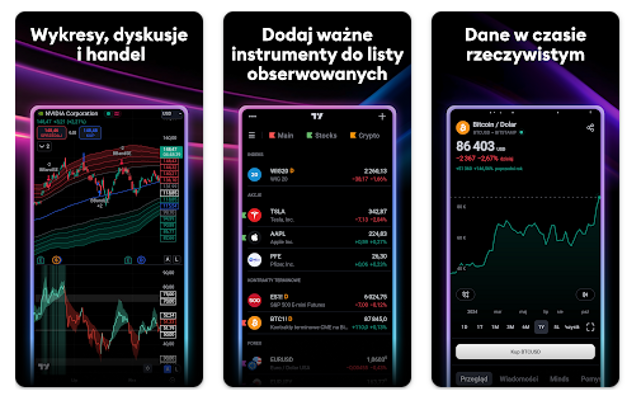
- TradingView is a powerful charting and analysis tool designed for traders and investors to gain insights into financial markets. With real-time data, users can explore a vast array of financial instruments through customizable charts and advanced technical indicators. The application fosters an active community where users can share ideas, strategies, and collaborate on market analysis. Additionally, TradingView's intuitive interface and accessibility across devices enable seamless trading experiences, helping users make informed decisions and improve their trading proficiency.
More Details
- Below are some of the notable features of TradingView:
- Real-Time Market Data: TradingView provides comprehensive real-time data feeds from global exchanges, enabling users to access up-to-the-minute information on a wide variety of assets, including stocks, forex, commodities, and cryptocurrencies. This functionality is crucial for making informed trading decisions that rely on the latest market movements.
- Customizable Charting Tools: The platform offers an extensive suite of customizable charting tools that allow users to visualize data through multiple chart types, including line, bar, and candlestick charts. Users can apply a range of technical indicators and drawing tools to analyze market trends, making it easier to identify potential entry and exit points in trading strategies.
- Social Networking Features: TradingView integrates a vibrant social community where users can share insights, trade ideas, and technical analyses. This interactive feature enhances user engagement and promotes collaborative learning, as traders can follow one another, join discussions, and evaluate ideas shared by experts in the field.
- Algorithmic Trading Support: For advanced users, TradingView supports the creation and implementation of algorithmic trading strategies through its Pine Script editor. This powerful tool allows traders to automate their trading processes by developing custom scripts that can execute trades based on predefined market conditions, further enhancing efficiency and precision in trading activities.
Extra Details
- How to uninstall the TradingView? You can uninstall TradingView on your mobile device by following these steps: Locate setting icon on your phone. Tap Application manager or Apps Touch TradingView. Press uninstall.
How to install the application
How to Download the TradingView App
- Download the TradingView app by opening the Google Play Store
- From there, click on the search bar at the top of the screen
- Type in the name of the application and click on the app icon in the search menu
- Tap "Download" and wait for the app to install onto your mobile device
DISCLAIMER
- The above app is a mobile app that will not change any system settings on your phone
- All apk files downloaded from our site are secure
- We provide the official download link from Google Play Store
- The trademarks and logos of all the merchants displayed on the website are the property of their respective owners. The website is not affiliated or associated with any of them
- Our website and its content strictly comply with all the terms and conditions of Google Ads Advertising policies and Google Unwanted Software policy
Steps to Uninstall android App
How to Uninstall the TradingView App
- If you no longer require the app, then you can delete it by first going to your phone settings
- Locate the Application Manager (App Manager)
- Find the TradingView app and then click “uninstall” to remove it from your device
Steps to Uninstall App on Apple devices
How to uninstall TradingView from your iOS device:
To delete the TradingView app, follow these instructions:
- Find the TradingView icon on your Home Screen or in the App Library.
- Tap and hold the icon until a menu shows up.
- Select Remove App from the options.
- Tap Delete App to confirm.
- Press the Home button or tap Done to finish.
Tips & Tricks
- Utilize the custom alerts feature to stay updated on market movements. Set alerts for specific price levels or indicators, ensuring you never miss a trading opportunity. This proactive approach helps in making timely decisions and managing your investments effectively.
- Explore the extensive library of technical indicators available in TradingView. By experimenting with various indicators, you can identify trends and patterns that may not be immediately apparent, enhancing your analysis and forecasting accuracy.
- Take advantage of the social trading community to gather insights and strategies from other traders. Engaging with the community allows you to learn different perspectives and potentially adopt successful techniques that can improve your trading outcomes.
- Use the built-in drawing tools to annotate your charts intuitively. Marking key support and resistance levels can enhance your visual analysis and help you create more informed strategies based on identifiable price action zones.
- Customizable watchlists enable you to monitor specific assets tailored to your trading interests. By organizing your watchlist, you can swiftly access crucial information, streamlining your analysis and decision-making process.
Popular APKs See more

HBO Max
2.6.0_(180) for Android

P.C. Richard Son
3.1.2(2018) for Android

Farm Fresh
1.0.3 for Android

Patreon
65.1.45 for Android

AutoZone
24.4 for Android

Cocomelon
3.9.0 for Android
Top APKs See more

Fresh Thyme
9.19.1 for Android

OMRON connect
009.006.00002 for Android

Hobby Lobby
3.0.13 for Android

Smith's
69.2 for Android

ShopRite
9.66.2 for Android

Cabelas
24.03.01 for Android
Top New Social Apps See more

Petco
8.6.3 for Android

XUMO
4.3.33 for Android

Homeland Supermarkets
5.4.0 for Android

Staples
8.6.2.914 for Android

FOX Weather
2.33.1 for Android

ABC NEWS
8.41.0 for Android