Stop Motion Studio

Stop Motion Studio
Category
Photography
| Technical Specification | Download | |
|---|---|---|
| Latest Updated | ||
| Latest Version | ||
| Developer | ||
| Operating system | Android, iOS | |
| Language | English | |
| Price | Free | |
| Available version | ||
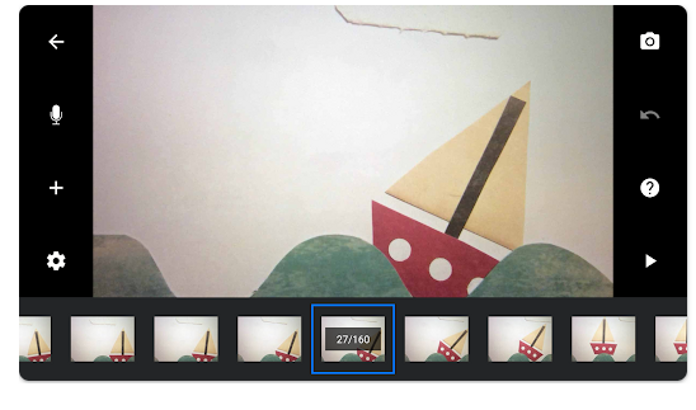
- Stop Motion Studio is an innovative application designed for enthusiasts and professionals alike who wish to create stunning stop-motion animations effortlessly. With its intuitive interface, users can easily capture images, manipulate frames, and add effects to produce high-quality videos. The app features advanced tools such as onion skinning, adjustable frame rates, and sound synchronization, enhancing the creative process. Stop Motion Studio empowers users to bring their artistic visions to life, making animation accessible and enjoyable for everyone.
More Details
- Below are some of the notable features of the Stop Motion Studio app:
- High-Resolution Frame Capture: The app offers the capability to capture images in high-definition resolution, ensuring that every frame of your stop motion animation is crisp and detailed. Users can select various resolutions, allowing for optimal quality according to their project requirements.
- Onion Skinning Tool: This feature provides translucent overlays of previous frames, enabling animators to meticulously align movements and maintain continuity throughout their animations. The adjustable opacity levels offer flexibility, accommodating different animation styles and personal preferences.
- Audio Synchronization Module: Stop Motion Studio includes an advanced audio synchronization feature, which allows users to visually align soundtracks with their animated sequences. This ensures that dialogue, sound effects, and background music are perfectly timed to enhance the storytelling experience.
- Customizable Animation Settings: Users can adjust various animation parameters, including frame rates and playback speeds, to achieve the desired effect. The customizable settings empower both novice and professional animators to tailor their projects, enhancing the overall creative control and efficiency during production.
Extra Details
- How to uninstall the Stop Motion Studio? You can uninstall Stop Motion Studio on your mobile device by following these steps: Locate setting icon on your phone. Tap Application manager or Apps Touch Stop Motion Studio. Press uninstall.
How to install the application
How to Download the Stop Motion Studio App
- Download the Stop Motion Studio app by opening the Google Play Store
- From there, click on the search bar at the top of the screen
- Type in the name of the application and click on the app icon in the search menu
- Tap "Download" and wait for the app to install onto your mobile device
DISCLAIMER
- The above app is a mobile app that will not change any system settings on your phone.
- We provide links to the official Google Play Store and App Store listings.
- The trademarks and logos of all the merchants displayed on the website are the property of their respective owners. The website is not affiliated or associated with any of them.
- Our website and its content strictly comply with all the terms and conditions of Google Ads Advertising policies and Google Unwanted Software policy.
Steps to Uninstall android App
How to Uninstall the Stop Motion Studio App
- If you no longer require the app, then you can delete it by first going to your phone settings
- Locate the Application Manager (App Manager)
- Find the Stop Motion Studio app and then click “uninstall” to remove it from your device
Steps to Uninstall App on Apple devices
How to uninstall Stop Motion Studio from your iOS device:
To delete the Stop Motion Studio app, follow these instructions:
- Find the Stop Motion Studio icon on your Home Screen or in the App Library.
- Tap and hold the icon until a menu shows up.
- Select Remove App from the options.
- Tap Delete App to confirm.
- Press the Home button or tap Done to finish.
Tips & Tricks
- Utilize the frame-by-frame preview feature to enhance your animations by visualizing each frame's transitions. This allows for precise adjustments and ensures smoother motion, leading to a more polished final product.
- Take advantage of the built-in audio synchronization tool to align your sound effects or music perfectly with your animation. This feature enhances the overall experience, making your project more engaging and enjoyable to viewers.
- Experiment with the slow-motion and fast-motion options to create dramatic effects or convey storytelling nuances. This functionality allows for greater creativity and narrative impact, elevating your animation to professional standards.
- Use the project export settings to tailor the resolution and format of your animations based on your intended platform, whether it's social media or a film festival. Proper settings maximize visual quality and ensure compatibility across devices.
- Explore the layering feature to combine multiple elements seamlessly within your animations. This not only saves time during the editing process but also allows for more intricate and visually appealing compositions.
Popular Apps See more

Texas Roadhouse
6.1.0 for Android

Albertsons Deals Delivery
2024.16.0 for Android

Shutterfly
11.7.0 for Android

Google Docs
1.24.242.01.90 for Android

Google Play Movies TV
4.39.1826.608511106.1-release for Android

Google Slides
1.24.472.00.90 for Android
Top Apps See more

Publix
8.12.1 for Android

Expedia App
2024.23.0 for Android

Dunkin’
11.1.0.341 for Android

Instacart
4.398.6-p for Android

Mercari: Your Marketplace
8.13.0 for Android

rakuten
6.32.1 for Android


