Screen Time - StayFree
Screen Time - StayFree
Category
Productivity
| Technical Specification | Download | |
|---|---|---|
| Latest Updated | ||
| Latest Version | ||
| Developer | ||
| Operating system | Android, iOS | |
| Language | English | |
| Price | Free | |
| Available version | ||
- Screen Time - StayFree is a comprehensive application designed to help users monitor and manage their device usage effectively. By tracking the time spent on various apps, it empowers users to identify patterns and set personalized limits, promoting healthier digital habits. The intuitive interface provides insightful analytics, enabling users to visualize their screen time and make informed decisions. With customizable notifications and reminders, StayFree encourages users to take breaks, ultimately enhancing productivity and well-being in an increasingly connected world.
More Details
- Below are some of the notable features of the Screen Time - StayFree app:
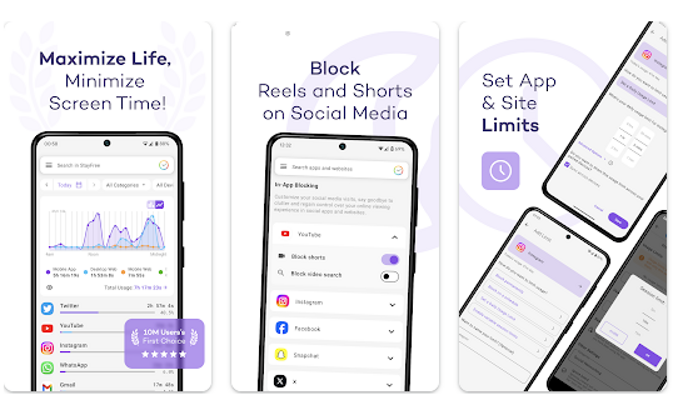
- Comprehensive Usage Analytics: Track your app utilization patterns with detailed metrics that include daily and weekly reports of screen time. This feature provides an intuitive interface to visualize your engagement, empowering users to identify trends and set personalized goals for reducing excessive device use.
- Customizable Alerts and Limits: Set tailored notifications and usage thresholds for individual applications to cultivate mindful consumption. By establishing these boundaries, users can create healthier digital habits that resonate with their personal objectives, facilitating a balanced approach to technology interaction.
- Focus Mode Activation: Utilize the Focus Mode functionality to temporarily disable distracting applications based on user-defined schedules. This feature enhances productivity and concentration by limiting access to time-consuming apps during critical work periods, promoting efficient task execution and focus retention.
- Insights into Habit Formation: Leverage sophisticated algorithms that analyze your screen time behavior to provide actionable insights and recommendations for improving digital wellness. This feature utilizes data-driven approaches to help users cultivate more intentional habits, enabling a more disciplined and fulfilling interaction with technology.
Extra Details
- How to uninstall the Screen Time - StayFree? You can uninstall Screen Time - StayFree on your mobile device by following these steps: Locate setting icon on your phone. Tap Application manager or Apps Touch Screen Time - StayFree. Press uninstall.
How to install the application
How to Download the Screen Time - StayFree App
- Download the Screen Time - StayFree app by opening the Google Play Store
- From there, click on the search bar at the top of the screen
- Type in the name of the application and click on the app icon in the search menu
- Tap "Download" and wait for the app to install onto your mobile device
DISCLAIMER
- The above app is a mobile app that will not change any system settings on your phone.
- We provide links to the official Google Play Store and App Store listings.
- The trademarks and logos of all the merchants displayed on the website are the property of their respective owners. The website is not affiliated or associated with any of them.
- Our website and its content strictly comply with all the terms and conditions of Google Ads Advertising policies and Google Unwanted Software policy.
Steps to Uninstall android App
How to Uninstall the Screen Time - StayFree App
- If you no longer require the app, then you can delete it by first going to your phone settings
- Locate the Application Manager (App Manager)
- Find the Screen Time - StayFree app and then click “uninstall” to remove it from your device
Steps to Uninstall App on Apple devices
How to uninstall Screen Time - StayFree from your iOS device:
To delete the Screen Time - StayFree app, follow these instructions:
- Find the Screen Time - StayFree icon on your Home Screen or in the App Library.
- Tap and hold the icon until a menu shows up.
- Select Remove App from the options.
- Tap Delete App to confirm.
- Press the Home button or tap Done to finish.
Tips & Tricks
- Utilize the "Daily Limit Alerts" feature to set personal boundaries by receiving notifications when you approach your predetermined screen time for specific apps. This can enhance your productivity and encourage healthier usage habits.
- Engage with the "Usage Statistics" to gain insights into your app habits. By analyzing this data, you can identify time-wasting patterns and make informed decisions to optimize your daily schedule.
- Take advantage of the "Focus Mode" to minimize distractions while working or studying. Activating this mode will temporarily block access to selected apps, allowing you to concentrate better and enhance your overall productivity.
- Explore the "Weekly Reports" to monitor your progress over time. These summaries empower you to reflect on your screen time behavior and make necessary adjustments to achieve a more balanced digital lifestyle.
- Customize your app settings with the "Whitelist" feature, allowing access only to essential applications during designated times. This can help create a more structured and efficient daily routine, reducing impulsive app usage.
Popular Apps See more

FOX NOW
3.52.5 for Android

Xfinity WiFi Hotspots
8.2.2 for Android

Steam
3.8.0 for Android

Sonos
16.1 for Android

WWE
53.5.1 for Android

Canva
2.268.0 for Android
Top Apps See more

Fortnite
12.2.17 for Android

YouTube TV
8.24.1 for Android

SoundHound
10.2.1 for Android

Twitch
20.0.0 for Android

Kanopy
6.5.0 for Android

The Voice Official App on NBC
3.16 for Android
Top New Social Apps See more

Disney+
3.1.3-rc1 for Android

The NBC App
9.8.0 for Android

Newsmax TV & Web
5.0.11 for Android

NBA Live Games Scores
0.40.1 for Android

GEICO Mobile
5.68.0 for Android

Sephora
24.12 for Android