Happn

Happn
Category
Dating
| Technical Specification | Download | |
|---|---|---|
| Latest Updated | ||
| Latest Version | ||
| Developer | ||
| Operating system | Android, iOS | |
| Language | English | |
| Price | Free | |
| Available version | ||
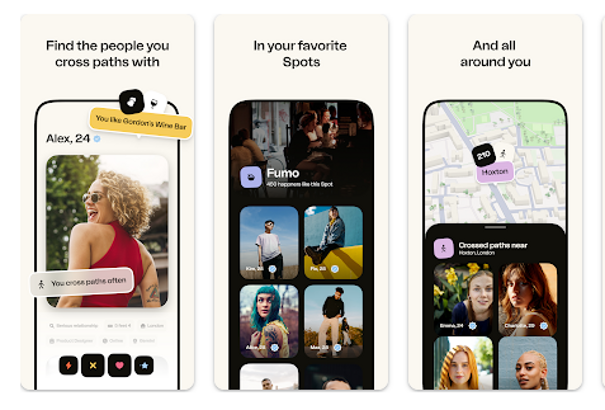
- Happn is a unique dating application that reconnects you with people you've crossed paths with throughout your day. Utilizing location-based technology, it identifies and notifies you of potential matches you've encountered near your vicinity. By encouraging spontaneity and fostering real-life interactions, Happn enhances your dating experience. Users can browse profiles, send messages, and find common interests, all within a friendly interface designed to facilitate genuine connections. Rediscover serendipity in your love life with Happn, where chance encounters lead to meaningful relationships.
More Details
- Below are some of the notable features of the Happn app:
- Real-Time Geolocation Matching: Utilizing advanced geolocation technology, Happn enables users to discover potential matches based on their real-time proximity. When you cross paths with another Happn user, their profile appears in your feed, ensuring that you connect with individuals you encounter in your daily life. This feature enhances the serendipity of encounters, making dating more spontaneous and organic.
- Charms to Enhance Engagement: Happn introduces a unique feature called Charms, allowing users to express interest in someone they admire without initiating a conversation. By sending a Charm, users can indicate their attraction in a subtle manner, increasing the likelihood of a reply. This functionality is especially beneficial for those who may feel hesitant to break the ice directly.
- Voice Messaging for Authentic Communication: To further personalize interactions, Happn incorporates Voice Messages, enabling users to send audio recordings as part of their conversations. This feature promotes authenticity and allows users to convey emotions and intentions more clearly than standard text, facilitating deeper connections right from the beginning.
- Invisible Mode for Enhanced Privacy: To address user concerns regarding privacy, Happn offers an Invisible Mode feature. When activated, this function allows users to browse through profiles without appearing to others, thereby providing a sense of control and discretion in the matching process. This is particularly useful for individuals who wish to explore potential connections without immediate scrutiny.
Extra Details
- How to uninstall the Happn? You can uninstall Happn on your mobile device by following these steps: Locate setting icon on your phone. Tap Application manager or Apps Touch Happn. Press uninstall.
How to install the application
How to Download the Happn App
- Download the Happn app by opening the Google Play Store
- From there, click on the search bar at the top of the screen
- Type in the name of the application and click on the app icon in the search menu
- Tap "Download" and wait for the app to install onto your mobile device
DISCLAIMER
- The above app is a mobile app that will not change any system settings on your phone
- All apk files downloaded from our site are secure
- We provide the official download link from Google Play Store
- The trademarks and logos of all the merchants displayed on the website are the property of their respective owners. The website is not affiliated or associated with any of them
- Our website and its content strictly comply with all the terms and conditions of Google Ads Advertising policies and Google Unwanted Software policy
Steps to Uninstall android App
How to Uninstall the Happn App
- If you no longer require the app, then you can delete it by first going to your phone settings
- Locate the Application Manager (App Manager)
- Find the Happn app and then click “uninstall” to remove it from your device
Steps to Uninstall App on Apple devices
How to uninstall Happn from your iOS device:
To delete the Happn app, follow these instructions:
- Find the Happn icon on your Home Screen or in the App Library.
- Tap and hold the icon until a menu shows up.
- Select Remove App from the options.
- Tap Delete App to confirm.
- Press the Home button or tap Done to finish.
Tips & Tricks
- Utilize the 'Map' feature to track your potential matches in real-time. This allows you to navigate to locations where you may have crossed paths with someone, increasing your chances of connecting with interesting individuals.
- Take advantage of the 'Invisible Mode' to browse profiles discreetly. This feature lets you explore matches without alerting others to your presence, giving you the freedom to assess compatibility before making a connection.
- Use 'Crush' to express interest in a profile. By sending a 'Crush,' you not only show your attraction but also create an opportunity for mutual matches, enhancing your dating experience.
- Customize your profile with engaging photos and a compelling bio. A well-crafted profile highlights your personality and interests, making it easier for potential matches to connect with you on a deeper level.
- Set your location preferences to fine-tune your search for matches. Adjusting this setting allows you to meet potential partners within your desired area, optimizing your chances of forming meaningful relationships.
Popular APKs See more

327.2.0.50.93 for Android

GroupMe
6.113.3 for Android

Microsoft Authenticator
6.2404.2444 for Android

The Sims 4
44.0.0.153460 for Android

Google Meet
2024.06.23.645915839.Release for Android

McDonalds
8.1.0 for Android
Top APKs See more

Your Phone Companion
1.24043.20.0 for Android

NHS App
4.8.0 for Android

Call Block
1.0.0.1054 for Android

WhatsApp Messenger
2.24.8.85 for Android

TracFone My Account
R24.3.1 for Android

Canva
2.268.0 for Android
Top New Social Apps See more

Straight Talk My Account
R24.3.1 for Android

Planet Fitness
9.7.13 for Android

Southwest Airlines
11.4.1 for Android

Google Earth
10.46.0.2 for Android

Fortnite
12.2.17 for Android

Skype
8.117.0.202 for Android