Fitia - Diet & Meal Planner

Fitia - Diet & Meal Planner
Category
Health & Fitness
| Technical Specification | Download | |
|---|---|---|
| Latest Updated | ||
| Latest Version | ||
| Developer | ||
| Operating system | Android, iOS | |
| Language | English | |
| Price | Free | |
| Available version | ||
- Fitia - Diet & Meal Planner is an innovative application designed to simplify healthy eating and meal planning. With personalized diet plans tailored to user preferences and nutritional needs, it empowers individuals to achieve their health goals. The app features an extensive database of recipes, easy grocery list generation, and progress tracking to ensure users stay motivated. Additionally, Fitia provides insights into calorie intake and Macronutrient distribution, making it easier for users to maintain a balanced diet and enhance their overall well-being.
More Details
- Below are some of the notable features of the Fitia - Diet & Meal Planner app:
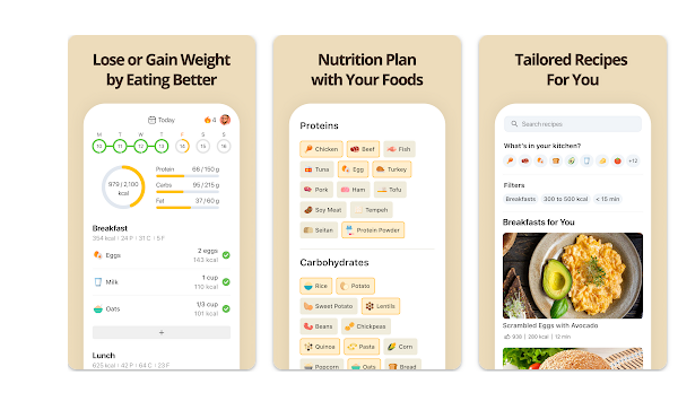
- Personalized Meal Plans: Fitia employs advanced algorithms to analyze user preferences, dietary restrictions, and nutritional goals, creating customized meal plans tailored to individual needs. This feature ensures that users receive meal suggestions that not only meet their calorie requirements but also align with their taste preferences and health objectives.
- Comprehensive Food Database: The app boasts an extensive database of over 1 million food items, including detailed nutritional information, serving sizes, and preparation methods. Users can easily search for specific foods or scan barcodes, allowing for seamless tracking of daily nutrient intake and ensuring informed dietary choices.
- Progress Tracking and Analytics: Fitia includes robust tracking features that allow users to monitor their dietary progress over time. This includes visual analytics such as graphs and charts that highlight caloric intake, macronutrient distribution, and weight changes, empowering users to make data-driven decisions and adjust their meal plans for optimal results.
- Recipe Integration and Customization: Users can explore an array of healthy recipes directly within the app, complete with nutritional breakdowns and ingredient substitutes. Moreover, the recipe customization feature allows users to adjust portion sizes or replace ingredients, ensuring that every meal aligns with their specific dietary restrictions or taste preferences.
Extra Details
- How to uninstall the Fitia - Diet & Meal Planner? You can uninstall Fitia - Diet & Meal Planner on your mobile device by following these steps: Locate setting icon on your phone. Tap Application manager or Apps Touch Fitia - Diet & Meal Planner. Press uninstall.
How to install the application
How to Download the Fitia - Diet & Meal Planner App
- Download the Fitia - Diet & Meal Planner app by opening the Google Play Store
- From there, click on the search bar at the top of the screen
- Type in the name of the application and click on the app icon in the search menu
- Tap "Download" and wait for the app to install onto your mobile device
DISCLAIMER
- The above app is a mobile app that will not change any system settings on your phone
- All apk files downloaded from our site are secure
- We provide the official download link from Google Play Store
- The trademarks and logos of all the merchants displayed on the website are the property of their respective owners. The website is not affiliated or associated with any of them
- Our website and its content strictly comply with all the terms and conditions of Google Ads Advertising policies and Google Unwanted Software policy
Steps to Uninstall android App
How to Uninstall the Fitia - Diet & Meal Planner App
- If you no longer require the app, then you can delete it by first going to your phone settings
- Locate the Application Manager (App Manager)
- Find the Fitia - Diet & Meal Planner app and then click “uninstall” to remove it from your device
Steps to Uninstall App on Apple devices
How to uninstall Fitia - Diet & Meal Planner from your iOS device:
To delete the Fitia - Diet & Meal Planner app, follow these instructions:
- Find the Fitia - Diet & Meal Planner icon on your Home Screen or in the App Library.
- Tap and hold the icon until a menu shows up.
- Select Remove App from the options.
- Tap Delete App to confirm.
- Press the Home button or tap Done to finish.
Tips & Tricks
- Utilize the personalized meal recommendations feature to receive tailored dietary suggestions based on your preferences and nutritional goals, ensuring that your meal plans align perfectly with your health objectives.
- Take advantage of the integrated grocery list tool, which automatically compiles ingredients based on your selected recipes, simplifying your shopping experience and minimizing food waste.
- Leverage the progress tracking functionality to monitor your daily caloric intake and macronutrient balance, helping you stay accountable and make informed adjustments to your diet as needed.
- Explore the diverse recipe database that offers exciting culinary ideas to keep your meals interesting and prevent dietary monotony, enhancing your overall motivation to stick to your meal plan.
- Engage with the community support feature to connect with other users for motivation, recipe sharing, and advice, fostering a collaborative environment that encourages healthy eating habits.
Popular APKs See more

Tractor Supply Company
1.40.1 for Android

Petco
8.6.3 for Android

Ace Hardware
3.1.2 for Android

Office Depot
8.43 for Android

99 Ranch Market
2.1.1 for Android

Best Buy
24.4.10 for Android
Top APKs See more

Hobby Lobby
3.0.13 for Android

Coborn's
1.1 for Android

Harbor Freight Tools
5.59.16 for Android

Weis Markets
4.5.1 for Android

Dofu Live Stream for NFL NBA NCAAF MLB NHL
21 for Android

OMRON connect
009.006.00002 for Android
Top New Social Apps See more

Dyson Link
6.2.24080 for Android

discovery+
17.30.6 for Android

AutoZone
24.4 for Android

Pick n Save
69.2 for Android

El Super Markets
2.0 for Android

Freshop
20240416 for Android