Disneyland

Disneyland
Category
Travel & Local
| Technical Specification | Download | |
|---|---|---|
| Latest Updated | Jun 10, 2024 | |
| Latest Version | 7.37 | |
| Developer | ||
| Operating system | Android, iOS | |
| Language | English | |
| Price | Free | |
| Available version | 7.37 | |
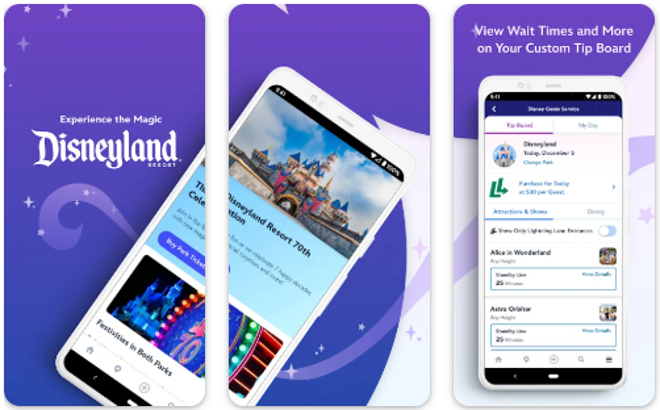
Explore the magical world of Disneyland with the official Disneyland app. Discover attractions, events, and dining options within the park to make the most of your visit. Easily navigate with interactive maps and check real-time wait times for rides. Plan your day by creating a personalized itinerary and receive notifications for upcoming shows and parades. Skip the lines with mobile ordering for food and merchandise. Make magical memories with the user-friendly Disneyland app.
More Details
- Below are some of the notable features of the app:
- Interactive Map Navigation: The Disneyland app includes a dynamic, user-friendly interactive map that guides visitors through the park. Featuring real-time location updates, the map enables guests to pinpoint their position and discover nearby attractions, dining options, and entertainment shows efficiently, enhancing the overall park experience.
- Virtual Queue Management: With the integration of the Virtual Queue system, the app revolutionizes your visit by allowing you to join queues for your favorite rides digitally. This feature minimizes physical waiting times and provides a scheduled window for boarding, ensuring you can plan your day more effectively and enjoy more attractions with less hassle.
- Mobile Food Ordering: Enhance your park visit with the convenience of Mobile Food Ordering. This feature allows you to order meals and snacks from select park restaurants directly through the app, skipping traditional queue lines. Payment integration is seamless, supporting multiple payment methods for quick and secure transactions.
- Entertainment Scheduling Tool: Stay updated with real-time schedules for parageways, character meet-and-greets, and live shows. The app’s scheduling tool lets you plan your day to the minute, ensuring you don't miss any must-see events. It also sends reminders and updates, making it invaluable for maximizing your time at the park.
Extra Details
- How to uninstall the Disneyland? You can uninstall Disneyland on your mobile device by following these steps: Locate setting icon on your phone. Tap Application manager or Apps Touch Disneyland. Press uninstall.
How to install the application
- How to download and install Disneyland on your mobile device? The steps below explain how you can download the app on Google Play
- Launch Google Play on your Android device * Input Disneyland in the search bar * Touch the most relevant search result * Tap Install to download the app * Wait for the process to complete.
DISCLAIMER
- The above app is a mobile app that will not change any system settings on your phone
- All apk files downloaded from our site are secure
- We provide the official download link from Google Play Store
- The trademarks and logos of all the merchants displayed on the website are the property of their respective owners. The website is not affiliated or associated with any of them
- Our website and its content strictly comply with all the terms and conditions of Google Ads Advertising policies and Google Unwanted Software policy
Steps to Uninstall android App
- How to uninstall the Disneyland? You can uninstall Disneyland on your mobile device by following these steps: Locate setting icon on your phone. Tap Application manager or Apps Touch Disneyland. Press uninstall.
Steps to Uninstall App on Apple devices
How to uninstall Disneyland from your iOS device:
To delete the Disneyland app, follow these instructions:
- Find the Disneyland icon on your Home Screen or in the App Library.
- Tap and hold the icon until a menu shows up.
- Select Remove App from the options.
- Tap Delete App to confirm.
- Press the Home button or tap Done to finish.
Tips & Tricks
- Stay updated on wait times for attractions by utilizing the Disneyland mobile app. This will help you plan your day efficiently and make the most of your time in the park.
- Take advantage of the FastPass feature to skip the lines for popular rides. Simply reserve your spot through the app and enjoy more attractions without the wait.
- Use the mobile ordering feature to avoid long lines at restaurants and food stalls. Pre-order your meals and snacks, and pick them up at your convenience to maximize your time exploring the park.
- Enable location services on the app to receive personalized recommendations and notifications based on your current location within Disneyland. This will enhance your overall experience and help you discover hidden gems in the park.
- Utilize the app's interactive map to navigate through Disneyland easily. Find your favorite attractions, restaurants, and restrooms with ease to make the most of your magical day at the park.
Popular APKs See more

Publix
8.12.1 for Android

My Boost
6.9.019 for Android

GasBuddy
700.97.23138 for Android

FedEx
9.13.0 for Android

Epic!
3.135.1 for Android

Domino’s
15.2.0 for Android
Top APKs See more

USPS MOBILE
5.10.0 for Android

DoorDash - Driver
7.70.7 for Android

T Mobile
9.14.2.94560 for Android

Zara
14.17.2 for Android

Cricut Design Space
5.56.1 for Android

Popeyes App
7.7.3 for Android
Top New Social Apps See more

Google Docs
1.24.242.01.90 for Android

Priceline
9.9.291 for Android

Smart Home Manager
2.2404.356 for Android

ixl
7.0.0 for Android

paybyphone
5.15.1.3473 for Android

Fortnite Battle Royale Season 12
3.0 for Android